



- Joined
- Apr 7, 2016
- Location
- Indiana, US
15 Basic Cybersecurity & Privacy Protection Tips
1: Lock Your Screens- On your phone
- On your tablet
- On your computer
- EVERY time you pocket the device or step away
- Avoid using biometric logins
Anyone who picks up your device or sits down at your computer gets all of your unencrypted data, access to your accounts, & the ability to impersonate you.
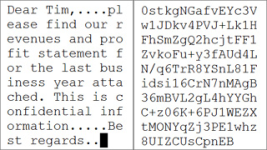
2: Use Full Disk or File Encryption
Why?
Without encrypting your data, even an inexperienced hacker can bypass all installed software security & gain access to all data stored on the drive.
An unencrypted file The same file encrypted
3: Use a Remote Device Manager
Why?
If your device is lost or stolen, you can lock it, access it GPS location, and/or wipe it before a thief gets your data. I use one called "Prey" that is cross-platform, but there are many to choose from.
4: Backup Your Data Regularly
Why?
Backups are insurance against theft, damage, accidental deletion, and ransomware attacks. It is the best protection against an accident or destructive virus or ransomware. However, be careful what backup system you use. Your data should be backed up automatically without you having to do anything, and it should be encrypted so if the backups are compromised, the data is still secure. If your backup solution is not encrypting your backups, find something else.
5: Take Software Updates Seriously & Apply Updates Regularly
Why?
Security bugs will be seen in mass, untargeted attacks within 6-24 hours (if not already occurring).
Failing to apply patches promptly guarantees bad actors have a way into your system.
EOL (End-of-Life) software doesn’t get patched even when known security vulnerabilities exist. For instance, Microsoft no longer issues security updates for Windows 7. That mean if a serious vulnerability is found in the Windows 7 OS next month, it will never be patched, rendering the machine defenseless against attacks using that exploit. Does this mean that old software like Windows XP and Windows 7 absolutely cannot be used? No; I have a Windows 7 system on my home network running legacy radar software I use for storm spotting. However, I have the system locked down so tight with its firewall and the network firewall that all it can do is run that software. There is no other way in. I don't recommend doing this unless you have experience with firewalls and filter rules.
6: Use Privacy-Focused Browsers & Extensions
Why?
Some browsers are safer than others based on how they monitor your browsing & search behavior & how that data gets used by the developer. Due to very recent developments, if you have Chrome and/or Edge installed on ANY computer or device, you need to completely uninstall it immediately. I'm highly disappointed that I have to say that because at one point Chrome showed a lot of promise. But now it has become a privacy and security nightmare.

Note: I recommend against using TOR unless you know exactly what you're doing.
Browser extensions to enhance privacy and security:

You can read in more detail about what each one of these extensions does for you before installing them, but I highly recommend all of them.
7: Use Caution Scanning QR Codes Using Your Phone's Camera.
Why?
A lot of companies and websites have taken to using QR codes to pull up menus, special deals, information on products, etc. As great as this technology is, it has led to a very easy to implement and impossible to detect security risk. For instance, let's say a local restaurant has placed QR codes at every table for customers to pull up the menu on their phone. As a bad actor, it would be very easy for me to create my own website that is an exact duplicate of that restaurant's site, and then surreptitiously go in with pre-printed QR code stickers that I place over theirs. Now when you scan that code, you go to my website, not theirs, where I can download malicious software or execute remote code on your phone, all while you're looking at their menu.
In my training, I put a QR code up on the screen and ask someone to scan it. It takes them to a special page on our company website where it says "Oops. If this had been an actual malicious QR code, your phone would most likely be compromised by now. Everything is a security and privacy threat until proven it's not." Don't scan random QR codes unless you are 100% sure they are going to do what they say they're going to do.
8: Use Credit Cards Instead of Debit Cards
Why?
Credit card companies, & in some cases merchants, are financially responsible for any fraudulent charges against your credit card account. There are fewer legal protections on your debit card / bank account.
9: Freeze Your Credit
Why?
This limits the damage that can be done if your Personal Identifying Information is obtained by criminals. They will be unable to open bank accounts, credit card accounts, or take out loans in your name. Identity theft can ruin your life for months, if not years.
This is a free service for all three major credit reporting bureaus, and lifting these freezes if you're shopping for a car can be done in minutes using your phone. This has been highly recommended by the Indiana Attorney General in an effort to reduce identity theft.
10: Store Your Passwords In A Safe Place
Why?
Storing your passwords in an encrypted password manager allows you to create unique, random passwords for websites and accounts without having to remember them. The only password you need to remember is to the password manager itself. We use Keepass because it is Free Open-Source Software and is available on all platforms. There are other good ones out there, but you really want one that is Open Source for the best security.
11: Use Strong, Unique, Individual Passwords
Never use the same password or PIN for two different accounts.
Why?
Hackers know that most people do exactly this, so If they obtain your Netflix account login and password, they will immediately try that login information on all other accounts they know belong to you. Once one account's password has been compromised, so have all other accounts using that same password.
Passwords should be substantially different. Don’t just change one character or number
Why?
Attackers know that people often use variations on their passwords, which simplifies their brute force attacks.
12: Use Passwords or Passphrases that are "Long & Strong."
Why?
Brute forcing the password 9!rDzQ@wQUKuG!E^Fr#aPm9U6K$XzP or the passphrase @niMal7 eNcOuRaGe telex-48 nui$ance will not be successful due to processing limitations of current CPUs. None of my passwords are less than 12 characters long and they all employ randomly generated sequences of numbers, upper and lowercase letters, and special characters.

This does not take into account Quantum Decryption techniques, but the only people that are going to have that level of technology are NSA, CIA, NRO, and other intelligence agencies. Criminals will not have access to this. However, I fully expect Quantum Encryption to become available to the general public by the end of this decade, which would theoretically defeat Quantum Decryption methods.
13: Become Scam Resistant
Why?
The vast majority of successful attacks start with someone voluntarily giving up information they should not have:
- Entering a username/password in a scammer’s web form
- Answering a “fun quiz” on Facebook
- Putting paperwork or disk drives with sensitive information in the trash (hint: shred everything!)
- Selling a phone or computer without securely scrubbing personal information
- Entering sensitive information on a legitimate web site that is poorly secured
Why?
More devices are becoming network-connected every day, usually with very little thought paid to security. IoT devices may be impossible to patch once security vulnerabilities are found. "Smart" TVs, thermostats, garage door openers, light bulbs, appliances, Roombas, etc. are all major threats to your privacy and security. EVERY network-connected device is a potential entry point to your network, & many have sensors that reveal data about your physical home or office:
- Nanny cams can allow anyone to view activity in your home
- Roombas store floor plans & photos of your house
- Ring provides doorbell video footage to LE without a warrant and to the Flock camera network without owner permission
- Thermostats can reveal when you are home (or not)
- Light bulbs can also reveal when you are home (or not)
- Garage door openers can be hacked to gain access
Why?
Any Network Administrator would rather take 90 seconds to verify an e-mail you have received is legitimate than have a user click on a malicious link or attachment that results in hours or days of undoing the damage that causes.


